This is a discord bot I made using the discord.js module for node.js.
This is a fairly simple bot that uses the example code found in the discord.js website and builds off of it.
The “get-started” code for Discord.JS is the following:
const Discord = require('discord.js');
const client = new Discord.Client();

client.on('ready', () => {
  console.log(`Logged in as ${client.user.tag}!`);
});

client.on('message', msg => {
  if (msg.content === 'ping') {
    msg.reply('Pong!');
  }
});

client.login('token');
My bot should be able to connect to a voice channel and be able to play one of my pre-defined audio clips.
I wanted the bot to have a prefix of !, so whenever I type a command like !connect, the bot will connect to my current voice channel.
This functionality can be implemented with the following code :
// ./Constants.js is just a class that exports a commands dictionary
let commands = require('./Constants').commands
client.on('message', async (message) => {
  let prefix = '!'
  if( message.content[0] === prefix){
      if (message.content === `${prefix}ping`) message.channel.send('It\'s working!')

      if (message.content.startsWith(commands.CONNECT)) {
          if (message.member.voice.channel) {
              connection = await message.member.voice.channel.join()
          } else {
              message.reply('You need to join a voice channel first!')
          }
      }

      if (message.content.startsWith(commands.DISCONNECT)) {
          connection.disconnect()
      }
  }
})
The main idea behind my bot was to highlight fun audio-clips for comedic effect.
For example, I wanted to simulate what MyInstants does, but with a discord bot.
I also wanted to make my codebase easy to add additional commands without having to reorganize code, so I decided to create a commands folder. This folder will execute a set of commands based off of what the user sends.
Currently the folder structure looks like this :
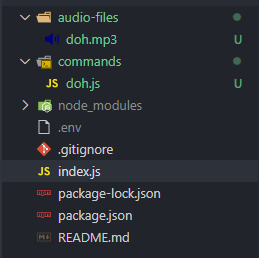
In this example, I will use the audio clip from MyInstants and make the bot say “D’oh” whenever the user types !doh
Within doh.js we have to export a few commands to play the audio file using Discord.JS’s StreamDispatcher class. This allows us to play audio files through the discord bot. The connection variable is passed within the index.js file, which is a VoiceChannel class.
// Run command, used to play the audio file
module.exports.run = async (connection, message = null, args = null) => {
    connection.play('./audio-files/doh.mp3', {
        volume: 1
    })
}

//Name of the command.
module.exports.name = 'doh'
In order for the bot to utilize the commands within the within the commands/ folder, the following code is added to the client.
let fs = require('fs')
fs.readdir('./commands/', (err, files) => {
    if (err) {
        console.error(err)
    }
    let jsfiles = files.filter((f) => f.split('.').pop() === 'js')
    if (jsfiles.length <= 0) {
        console.error('No commands found.')
    }
    jsfiles.forEach((file) => {
        let props = require(`./commands/${file}`)
        // console.log(`${file} loaded`)
        client.commands.set(props.name, props)
    })
})
Then, all we need to do now is isolate the command if the user types a message with the prefix ! and execute a command if it is within the commands/ folder.
Note: The user needs to use the !connect command to connect the bot to the user’s channel. This will populate the connection variable that was declared before the client.on(..) command.
var connection = null

client.on('message', async (message) => {
    let prefix = '!'
    //For exaple if the user types in '!doh'
    if( message.content[0] === prefix){

        //Array will be ['!doh']
        let messageArray = message.content.split(' ')

        //Command will be '!doh'
        let cmd = messageArray[0]

        //Args will be any thing after the '!doh, meant for future command
        //implementations
        let args = messageArray.slice(1)

        let commandFile = client.commands.get(cmd.slice(prefix.length))
        if (commandFile) {
            if (connection === null) {
                message.reply('You must connect the bot with the `!connect` command!')
            } else {
                commandFile.run(connection, message)
            }
        }

        ...
This is a basic command for me to keep track of what commands are available within the commands/ folder :
if (message.content.startsWith(commands.HELP)) {
    let help = 'Here are the commands you can use : ```'
    for (const [key, val] of client.commands.entries()) {
        if (val.usage) {
            help += '!' + val.usage
        } else {
            help += `!${key} \n`
        }
    }
    help += '```'
    message.channel.send(help)
}
Basic functionality of my bot is done. The idea behind the usage of the bot is the following :
- The user connects to a voice channel and uses the
!connectcommand to connect the bot to the same channel as the user - The user uses
!helpto display all available audio-clips - The user can type one of the commands
More features wil be added to the bot as I think of new ideas, as of right now, this bot supports simple audio-bit commands, such as the !doh command.