Thanks to the help of this forum thread, I was able to enable developer mode on my 2016 Honda Accord Stock head unit. I think this is awesome because it allows users to install custom applications, such as Spotify or Waze, directly onto the head unit without having to your phone.
This gave me an idea. I wanted a way to track the fuel consumption of my car, because according to Google, this is supposed to be my fuel economy in a normal scenario :
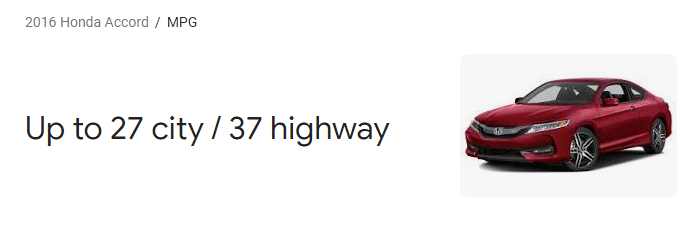
I wanted to put these claims to the test, so I made an app that will verify the statement.
Since MPG = Miles / Gallons, we need to figure out the distance travelled from fuel stop to the next. Then all we have to do is figure out how much fuel was used in between these two stops.
To accomplish this, all I need to do is record the amount of fuel that my car took during the gas stop and the current odometer reading on my car.
So our bare minimum requirements are to gather the amount of fuel that my car took during a gas stop, and the current odometer reading of the car. I think it’d be useful to also put in the amount of money I paid in total, the price I paid per gallon of fuel, and the date at which I got the fuel.
With this information, I knew I could just append the information into a CSV file and process it later in Excel
I wanted a super simple design mainly because I wanted the app to perform well on a performance-limited head unit and it had to not interfere with the main functionality of the system.
So here’s what I came up with:
I know it’s really ugly, but the functionality is way more important than the way it looks, especially because I’m the only one that’ll be using the app.
Here it is in action, on the head-unit of my car :
When my car is near my house, it’ll automatically connect to wi-fi
When I click submit, the head-unit makes a POST request to my Raspberry Pi, which is statically hosted on my network.
This information will be inserted into a CSV file and then processed whenever I get the chance.
The ideal workflow I came up was with is this : As soon as I arrive at home, my Accord will automatically connect to my wi-fi network. Once I’m parked in the driveway, I can enter my information into the app and it’ll upload the CSV data to a Flask server I have hosted on a Raspberry Pi on my network.
Here’s some of the data I was able to derive from the Accord gas logger :
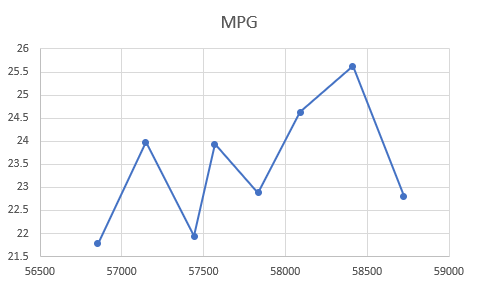
As you can see, the my MPG over about 2,000 miles was around 24mpg. I think this is pretty believable because I live in New Jersey, which inherently comes with doing mostly stop-and-go city driving.
Overall, I think this project was a huge success. I learned a lot about Android programming and this project helped me understand how this head-unit exploit was even possible with the help of LiveOverflow’s YouTube channel.